Selection essentials
- For occasional manual translation, Google Translate’s website or app may cover the task.
- For recurring application content, compare specific APIs, allowances, and integration requirements.
- Evaluate AI Translate’s character subscriptions against your actual volume; assess Google Cloud’s advanced features separately.
- Verify translation quality, formatting, and settled charges with your own content.
Define the products before comparing them
Google Translate’s website and apps let people translate content directly. Developers integrating translation into an application generally evaluate Google Cloud Translation. Their usage patterns and pricing should not be treated as interchangeable. The price comparison here is limited to AI Translate’s character subscriptions and Google Cloud Translation’s standard NMT (neural machine translation) text service. Google also offers Translation LLM, adaptive translation, and document translation, with different billing rules. The official Google Cloud Translation pricing page lists those separately. AI Translate is a specific service name. Its name alone does not establish support for prompts, brand-voice customization, or every capability associated with large language models. Check the actual API contract.What AI Translate offers developers
The current AI Translate Character listing describes batch text translation, HTML translation, and automatic source-language detection, and advertises support for more than 249 languages. Its documentation exposes endpoints including/translate, /translateHtml, and /languages. Confirm the available language codes, then test representative content.
These endpoints can support catalog, publishing, or customer-support workflows. For example, enqueue a translation when the source changes, then save the target language, source version, and review status. Your application still needs deduplication, caching, and publishing logic; a translation API does not supply a complete localization system.
The listing says it uses Google AI and offers the same quality as Google Translate. These are service-provider claims. They do not independently establish identical results across every language pair and content type, or an official partnership with Google.
Google’s Advanced glossary documentation describes a mechanism for consistent translation of domain-specific terms and named entities. Evaluate that capability separately when terminology consistency is a requirement.
Compare prices against your own volume
The AI Translate listing’s pricing tab showed these subscriptions on the verification date: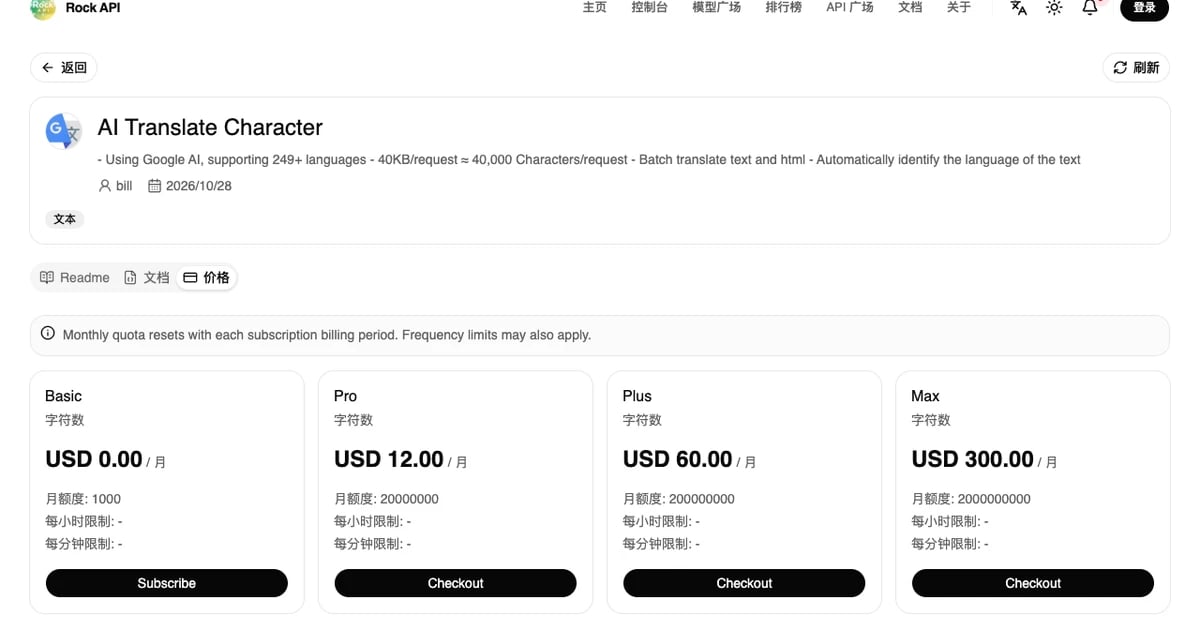
The USD 0.15 rate assumes full use of Max’s included allowance. If you process only one million characters in a month but buy a USD 300 subscription, that advertised effective rate does not represent your actual cost. Choose a plan using expected consumption and applicable limits.
Google’s public pricing lists a monthly credit of up to USD 10 covering the first 500,000 standard NMT characters. Basic and Advanced share that credit. Above the allowance, the applicable tier is USD 20 per million characters; Google advises contacting sales above one billion characters per month. This is not a single price for all Google translation features. Google counts Unicode code points, including whitespace and untranslated characters, rather than only letters or Chinese characters.
Consider a hypothetical budget: one million source characters translated into two target languages each month. Estimate two million processed characters, and assume AI Translate’s actual deductions match that estimate. Pro costs USD 12 per month. If Google’s monthly credit has not been consumed by other eligible usage, standard NMT would cost:
(2,000,000 − 500,000) ÷ 1,000,000 × USD 20 = USD 30
If your monthly processing is only 200,000 characters and the credit remains available, Google NMT may have no translation charge. That changes the choice at low volume. These estimates exclude taxes, currency conversion, negotiated discounts, and extra cloud resources; they do not establish feature or quality equivalence. Confirm AI Translate’s deductions for multiple target languages, failed requests, and exhausted allowances before integrating. The character-pricing guide explains why allowance utilization matters.
Run a small evaluation before production
An API is useful when its output can actually serve your product. Prepare representative samples: short buttons, product descriptions, technical terminology, negation, and text containing{name}, links, numbers, or HTML. Ask reviewers who understand the target language to identify meaning errors, inconsistent terms, and damaged formatting. Fluency alone is not enough.
Use the subscription and online-testing workflow to verify the request contract before adding background jobs. Translate changed content, tie each translation to a source version, and prevent an older job from overwriting a newer result. Retry temporary failures with limits and preserve the source for users or editors to consult.
Measure cost per usable translation, including duplicate calls, retries, and manual correction. Before sending customer messages, review the selected service’s data-processing terms and the security and privacy assessment. A low price or successful response does not establish those conditions.