AI Translate usage: 3.8M calls in 7 days on the OpenAPI marketplace
AI Translate is a high-frequency OpenAPI marketplace use case: the request path is short, the output is clear, and the API fits content platforms, ecommerce teams, customer support tools, browser extensions, internal operations, and automation workflows. For a concise product walkthrough, watch the AI translation API video overview. The 7-day console screenshot below shows recent AI Translate usage: 3.8 million total API calls, a 0.34% average error rate, and 623.7 ms average latency.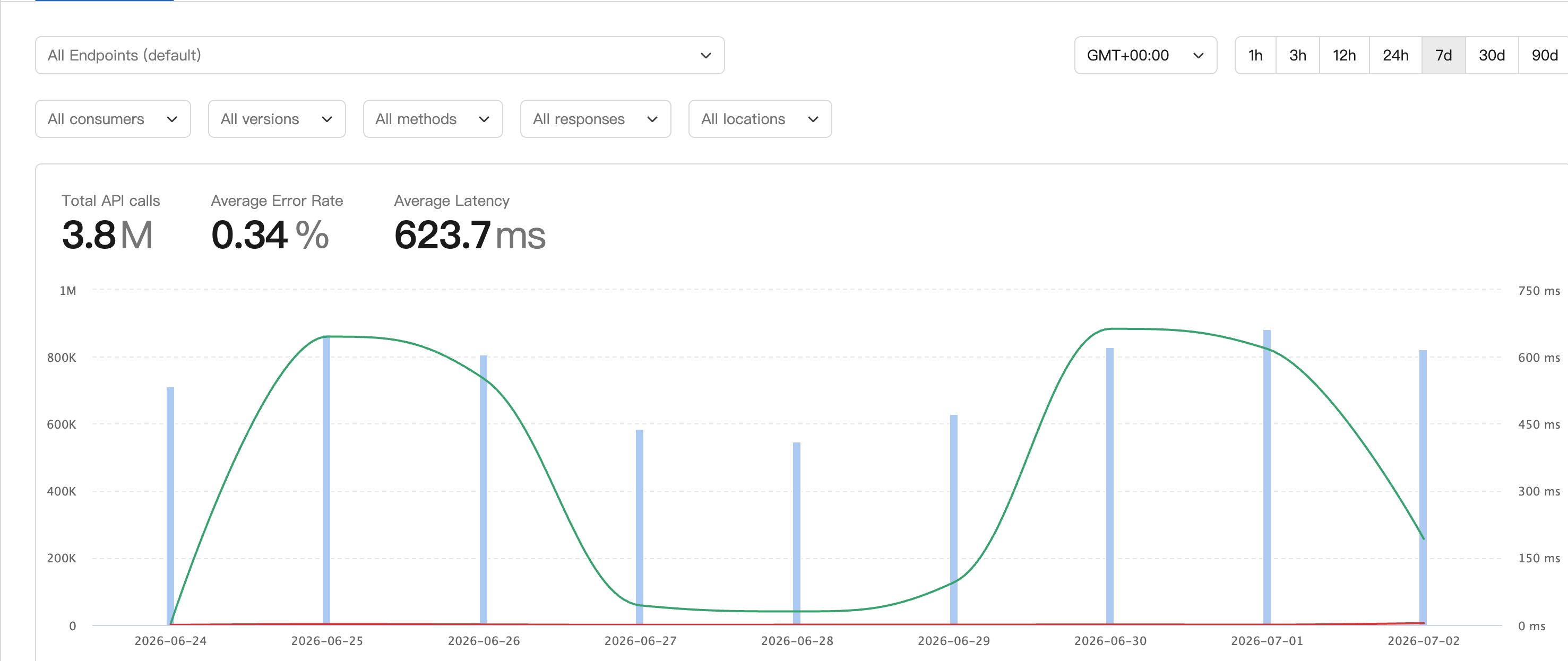
Key metrics
The bars show visible daily traffic peaks, with some days near 800K to 900K calls by chart reading. The green latency curve is higher around June 25 and June 30 to July 1, so buyers should continue watching how latency changes with traffic peaks, concurrency, and upstream processing.
What the data suggests
First, AI Translate is not only receiving trial traffic. 3.8 million calls in 7 days suggests repeated workloads such as batch content translation, user-generated content processing, multilingual product data, customer support message translation, or internal data cleanup. Second, the error rate is in a manageable range. A 0.34% average error rate does not remove the need for error handling, but it suggests failures are not the main bottleneck. Before production use, buyers should check whether failures come from invalid parameters, quota limits, timeouts, upstream availability, or unsupported inputs. Third, the average latency fits translation flows where a short wait is acceptable. 623.7 ms can work for back-end jobs, editor assistance, batch translation queues, and support-agent assistance. For realtime typing, live captions, or strict interactive flows, also test P95 and P99 latency.How buyers should evaluate AI Translate for production
When subscribing to a translation service in an OpenAPI marketplace, do not judge it only by whether one request returns a result. Evaluate usage, reliability, latency, quality, and cost together.
If your product shows translated text directly to end users, prepare sample content that covers short sentences, long paragraphs, product titles, support conversations, technical terms, and formatted text. After online testing succeeds, move to a small production rollout.
Good fits for AI Translate
- Content platforms translating articles, comments, or summaries into multiple languages.
- Cross-border ecommerce teams translating product titles, descriptions, specs, and support messages.
- SaaS products generating multilingual notifications, help docs, or workflow content.
- Operations teams translating CSV files, tickets, campaign copy, and user feedback.
- AI agents converting language before or after calling external tools.
Integration tips
Before production integration, complete three checks:- Subscribe to AI Translate in Rock API and use online testing to confirm parameters, authentication, and response shape.
- Run a small batch with real business samples and record success rate, average latency, and translation quality.
- Add timeouts, retries, fallback behavior, and logging fields in your app, including request ID, source language, target language, text length, status code, and duration.